F5 Application Service Proxy deployment review
We have successfully deployed our F5 North-South (Marathon BIG-IP Controller) and F5 East-West solutions (Application Service Proxy and Marathon ASP Controller)
How does the Frontend has been able to go automatically through our ASP instances to access the backend application.
Here are the different key things we did to make it happen:
- When we deployed our frontend application, we specified a label called:
F5DEMO_BACKEND_URLwith the valuehttp://asp-my-backend.marathon.mesos:31899/. This was explaining to our frontend application where the “Backend App” link on the page should be redirected to: Frontend application deployment. - When we deployed our backend application, we specified the following
information:
servicePortset to the value31899. This information was to say to ASP on which port it should be listening to load balance the traffic: ASP and Marathon ASP Controller Usage. - The last thing is how does our frontend connect to the ASP(s) that is dynamically generated? This is done by leveraging mesos-dns.
Every application that gets created in marathon will have automatically a DNS
name setup in mesos-dns. it will have the following format:
<application id> maraton.mesos
To test it, we can try a few queries against our mesos dns. Connect to either Agent1 or Agent2 (their DNS nameserver is mesos-dns)
nslookup
> my-frontend.marathon.mesos
Server:         10.2.10.40
Address:        10.2.10.40#53

Name:   my-frontend.marathon.mesos
Address: 10.2.10.40

> my-backend.marathon.mesos
Server:         10.2.10.40
Address:        10.2.10.40#53

Name:   my-backend.marathon.mesos
Address: 10.2.10.40

> asp-my-backend.marathon.mesos
Server:         10.2.10.40
Address:        10.2.10.40#53

Name:   asp-my-backend.marathon.mesos
Address: 10.2.10.50
Name:   asp-my-backend.marathon.mesos
Address: 10.2.10.40
Here we can see that our asp instances also have a DNS name that we can resolve. This is this hostname we specified when we started our frontend application with the backend link.
In our frontend application deployment, we also forced the ServicePort to
31899 so that we knew on which port our ASP would be listening to. This works
well but also create some issues: What would happen if we want to deploy more
than 2 ASP instances ? In our setup it won’t work: We have only 2 agents, so
we have only 2 ports available to listen on 31899. Marathon would be able to
deploy 2 instances and then would fail allocating more instances:
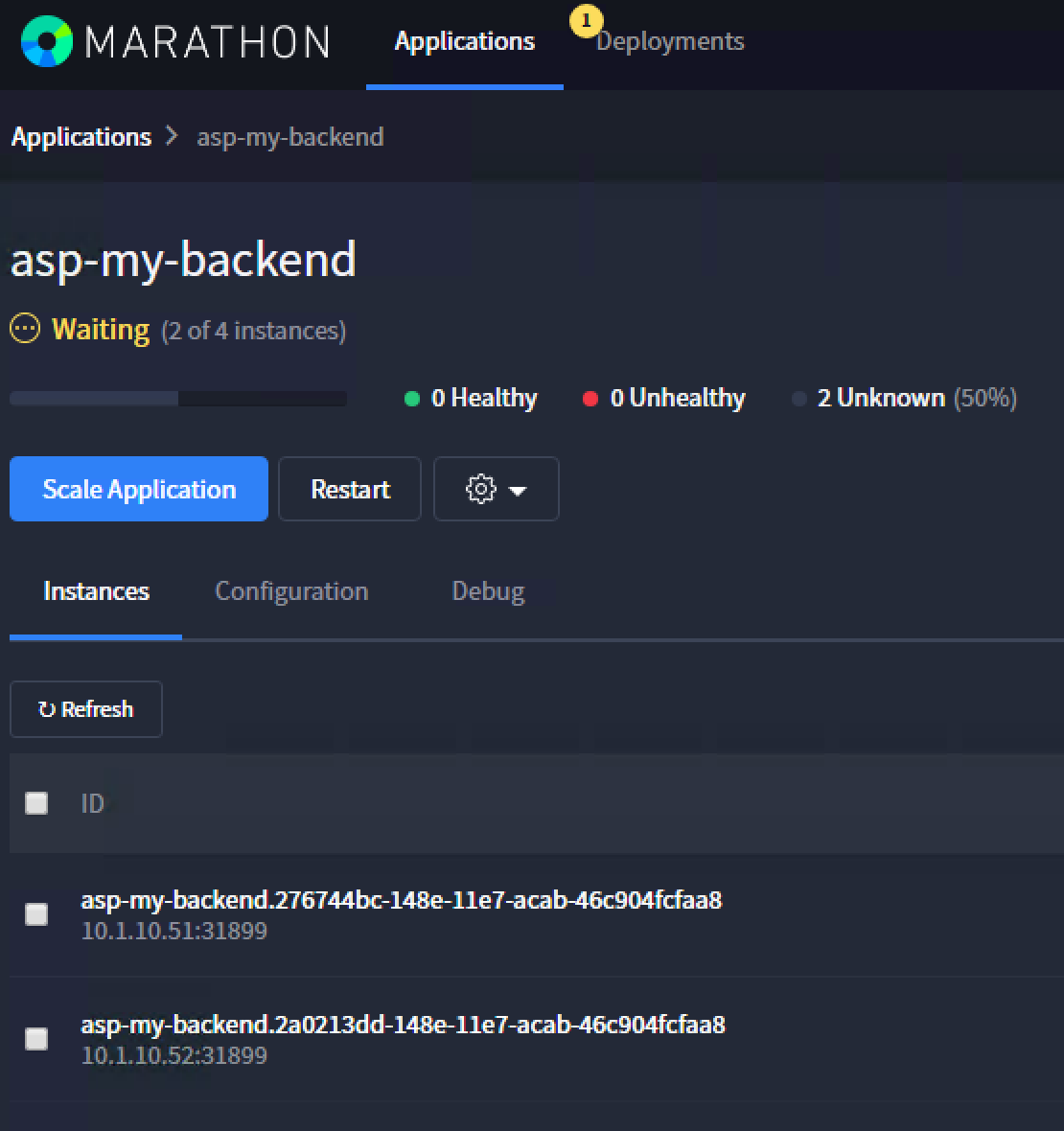
This is something we can validate also via the marathon queue information accessible via : http://10.2.10.10:8080/v2/queue
{"queue":[{"count":2,"delay":{"timeLeftSeconds":0,"overdue":true},"since":"2017-03-29T14:50:26.869Z","processedOffersSummary":
{"processedOffersCount":8,"unusedOffersCount":6,"lastUnusedOfferAt":"2017-03-29T14:50:36.805Z","lastUsedOfferAt":"2017-03-29T14:50:31.788Z",
"rejectSummaryLastOffers":[
{"reason":"UnfulfilledRole","declined":0,"processed":2},
{"reason":"UnfulfilledConstraint","declined":0,"processed":2},
{"reason":"NoCorrespondingReservationFound","declined":0,"processed":2},
{"reason":"InsufficientCpus","declined":0,"processed":2},
{"reason":"InsufficientMemory","declined":0,"processed":2},
{"reason":"InsufficientDisk","declined":0,"processed":2},
{"reason":"InsufficientGpus","declined":0,"processed":2},

//THIS IS THE ISSUE
{"reason":"InsufficientPorts","declined":2,"processed":2}],

"rejectSummaryLaunchAttempt":[
{"reason":"UnfulfilledRole","declined":0,"processed":8},
{"reason":"UnfulfilledConstraint","declined":0,"processed":8},{"reason":"NoCorrespondingReservationFound","declined":0,"processed":8},{"reason":"InsufficientCpus","declined":0,"processed":8},{"reason":"InsufficientMemory","declined":0,"processed":8},{"reason":"InsufficientDisk","declined":0,"processed":8},{"reason":"InsufficientGpus","declined":0,"processed":8},{"reason":"InsufficientPorts","declined":6,"processed":8}]},"app":{"id":"/asp-my-backend","backoffFactor":1.15,"backoffSeconds":1,"container":{"type":"DOCKER","docker":{"forcePullImage":true,"image":"10.2.10.10:5000/asp:v1.0.0","network":"BRIDGE","parameters":[],"portMappings":[{"containerPort":8000,"hostPort":31899,"labels":{},"protocol":"tcp","servicePort":10004}],"privileged":false},"volumes":[]},"cpus":0.2,"disk":0,"env":{"APP_NAME":"my-backend","ASP_CONFIG":"{\"global\":{\"console-log-level\":\"debug\"},\"orchestration\":{\"marathon\":{\"uri\":\"http://10.2.10.10:8080\"}},\"stats\":{\"flush-interval\":10000},\"virtual-servers\":[{\"destination\":{\"address\":\"0.0.0.0\",\"port\":31899},\"service-name\":\"/my-backend\",\"ip-protocol\":\"http\",\"load-balancing-mode\":\"round-robin\",\"keep-alive-msecs\":1000,\"flags\":{}}]}"},"executor":"","instances":4,"labels":{"asp-for":"/my-backend"},"maxLaunchDelaySeconds":3600,"mem":128,"gpus":0,"portDefinitions":[{"port":10004,"name":"default","protocol":"tcp"}],"requirePorts":false,"upgradeStrategy":{"maximumOverCapacity":1,"minimumHealthCapacity":1},"version":"2017-03-29T14:50:26.803Z","versionInfo":{"lastScalingAt":"2017-03-29T14:50:26.803Z","lastConfigChangeAt":"2017-03-29T14:50:26.803Z"},"killSelection":"YOUNGEST_FIRST","unreachableStrategy":{"inactiveAfterSeconds":300,"expungeAfterSeconds":600}}}]}
Here we can see that the issue is related to port allocation.
Note
The above queue detail is an example only and entirely based on the running state of what is being built. If the lab is running normal and everything has been deployed, you may only see the following:
{"queue":[]}
How can we bypass this kind of restriction ? by leveraging even more mesos-dns with SRV records. Let’s try to do a few more things around mesos-dns:
$ dig _asp-my-backend._tcp.marathon.mesos SRV

; <<>> DiG 9.10.3-P4-Ubuntu <<>> _asp-my-backend._tcp.marathon.mesos SRV
;; global options: +cmd
;; Got answer:
;; ->>HEADER<<- opcode: QUERY, status: NOERROR, id: 13155
;; flags: qr aa rd ra; QUERY: 1, ANSWER: 2, AUTHORITY: 0, ADDITIONAL: 2

;; QUESTION SECTION:
;_asp-my-backend._tcp.marathon.mesos. IN        SRV

;; ANSWER SECTION:
_asp-my-backend._tcp.marathon.mesos. 60 IN SRV  0 0 31899 asp-my-backend-igyz4-s1.marathon.mesos.
_asp-my-backend._tcp.marathon.mesos. 60 IN SRV  0 0 31899 asp-my-backend-yiyxj-s0.marathon.mesos.

;; ADDITIONAL SECTION:
asp-my-backend-igyz4-s1.marathon.mesos. 60 IN A 10.2.10.40
asp-my-backend-yiyxj-s0.marathon.mesos. 60 IN A 10.2.10.50

;; Query time: 0 msec
;; SERVER: 10.2.10.40#53(10.2.10.40)
;; WHEN: Wed Mar 29 14:57:43 UTC 2017
;; MSG SIZE  rcvd: 173
Here you can see that we got two SRV records for our DNS name asp-my-backend. If we review the related hostname :
$ dig asp-my-backend-igyz4-s1.marathon.mesos

; <<>> DiG 9.10.3-P4-Ubuntu <<>> asp-my-backend-igyz4-s1.marathon.mesos
;; global options: +cmd
;; Got answer:
;; ->>HEADER<<- opcode: QUERY, status: NOERROR, id: 41191
;; flags: qr aa rd ra; QUERY: 1, ANSWER: 1, AUTHORITY: 0, ADDITIONAL: 0

;; QUESTION SECTION:
;asp-my-backend-igyz4-s1.marathon.mesos.        IN A

;; ANSWER SECTION:
asp-my-backend-igyz4-s1.marathon.mesos. 60 IN A 10.2.10.40

;; Query time: 0 msec
;; SERVER: 10.2.10.40#53(10.2.10.40)
;; WHEN: Wed Mar 29 14:58:27 UTC 2017
;; MSG SIZE  rcvd: 72

$ dig asp-my-backend-yiyxj-s0.marathon.mesos

; <<>> DiG 9.10.3-P4-Ubuntu <<>> asp-my-backend-yiyxj-s0.marathon.mesos
;; global options: +cmd
;; Got answer:
;; ->>HEADER<<- opcode: QUERY, status: NOERROR, id: 29183
;; flags: qr aa rd ra; QUERY: 1, ANSWER: 1, AUTHORITY: 0, ADDITIONAL: 0

;; QUESTION SECTION:
;asp-my-backend-yiyxj-s0.marathon.mesos.        IN A

;; ANSWER SECTION:
asp-my-backend-yiyxj-s0.marathon.mesos. 60 IN A 10.2.10.50

;; Query time: 0 msec
;; SERVER: 10.2.10.40#53(10.2.10.40)
;; WHEN: Wed Mar 29 14:58:39 UTC 2017
;; MSG SIZE  rcvd: 72
So by leveraging the SRV records, we can avoid facing port restrictions