ASP and Marathon ASP Controller setup
To use ASP, we will need setup first the F5 Marathon ASP Controller.
The first step will be to load the relevant F5 container images into our system. if you use the UDF blueprint, it’s already done in our private registry (10.2.10.10:5000). You can also retrieve the version we use with the following command: sudo docker pull f5networks/marathon-asp-ctlr:1.0.0
The official F5 ASP documentation is here: Install the F5 Kubernetes Application Service Proxy and Deploy the F5 Application Service Proxy with the F5 Kubernetes Prox
Deploy F5 Marathon ASP Controller
To deploy the ASP Controller, connect to the Marathon UI and click on “Create Application”, switch to “JSON Mode”
Copy/Paste the following JSON blob:
{
        "id": "f5/marathon-asp-ctlr",
        "cpus": 0.5,
        "mem": 128,
        "instances": 1,
        "container": {
                "type": "DOCKER",
                "docker": {
                  "image": "f5networks/marathon-asp-ctlr:1.0.0",
                  "network": "BRIDGE",
                  "forcePullImage": true,
                  "privileged": false,
                  "portMappings": []
},
                "volumes": []
        },
        "env": {
                "MARATHON_URL": "http://10.2.10.10:8080",
                "ASP_DEFAULT_CONTAINER": "10.2.10.10:5000/asp:1.0.0",
                "ASP_ENABLE_LABEL": "asp",
                "ASP_DEFAULT_CPU": "0.2",
                "ASP_DEFAULT_MEM": "128",
                "ASP_DEFAULT_LOG_LEVEL": "debug",
                "ASP_DEFAULT_STATS_FLUSH_INTERVAL": "10000"
        }
}
A few things to consider:
- If you’re not running this lab at Agility, make sure to update the image attribute and ASP_DEFAULT_CONTAINER attributes with the relevant images in your environment
- You can see that we specified the resources that will be assigned to ASP
- You have the capabilities to have ASP send logs to a remote solution like Splunk
Warning
When using Marathon, you cannot use UPPERCASE for the application ID. Otherwise the application deployment will fail
Check deployment
You can check the deployment of your container the same way that we check the deployment of the F5 Marathon BIG-IP Controller:
- Via the Marathon UI, go to Application > f5 > marathon-asp-ctlr and check the agent used to deploy the controller
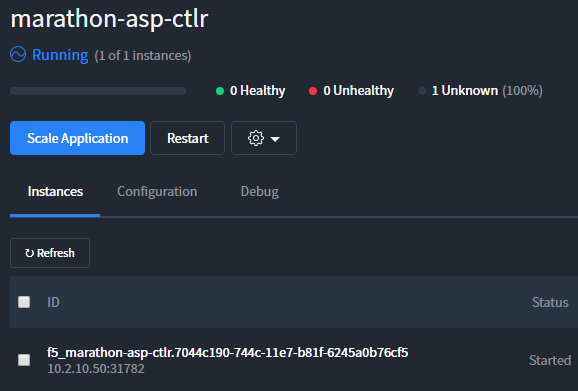
In this example, we can see that the ASP Controller container was deployed on 10.2.10.50
- SSH to the relevant agent
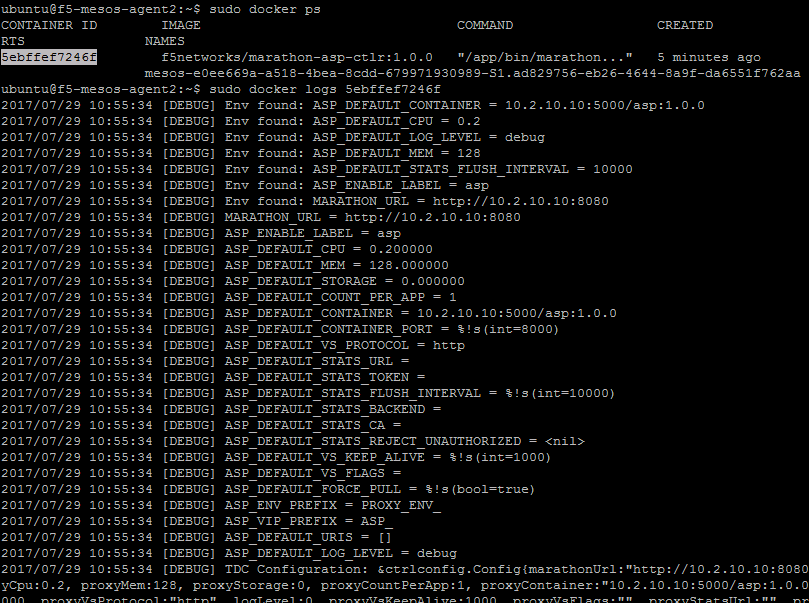
- Use sudo docker ps to identify the container ID and run sudo docker logs <container ID>